How to Collect Vendor Payments for a Farmers Market
Updated: January 2026
Collecting vendor payments is one of the most important and most frustrating parts of running a farmers market.
In a recurring market, the hard part is usually not just taking a payment. It is tying money back to vendor participation, session reporting, reconciliation, and closeout.
This guide explains how to collect and track vendor payments using the kind of workflow The Market Manager actually has: fee rules, recorded payments, session financials, reconciliation, and carry-forward.
What are farmers market vendor payments?
Farmers market vendor payments are the fee and settlement records tied to a vendor's participation in a market or session.
In this workflow, that can include:
- booth or participation fees
- session-based fees
- fee-rule driven charges and surcharges
- recorded payments against those fees
- settlements and adjustments during closeout
- carry-forward balances into future sessions
That is much closer to real recurring market billing than a simple invoice list.
Quick summary
To manage vendor payments for a farmers market, you need to:
- define fee rules and due logic
- tie fees to session submissions
- record payments consistently
- track pending, partial, paid, or waived fee status
- review financial state at the session level
- reconcile references and cleanup issues
- carry balances forward when needed
- confirm report readiness before closeout
Table of contents
- Define your fee structure
- Tie fees to session submissions
- Record payments consistently
- Track fee status in one place
- Review session financial state
- Reconcile references and exceptions
- Use carry-forward when a balance belongs to a future session
- Close out with report readiness in mind
Step 1: Define your fee structure
Before reviewing payments, define how charges are created.
In this product that usually means:
- fee rules
- surcharges
- exemptions
- due dates
- session-level policies
Good payment tracking starts with consistent fee creation, not just a list of amounts typed into a spreadsheet.
Step 2: Tie fees to session submissions
One of the strongest parts of this billing workflow is that fees are tied to session submissions.
That means the money picture sits next to:
- vendor participation
- reported sales or collected amounts
- review status
- fee snapshots
- later settlement activity
This is different from generic market management software that treats billing as a disconnected afterthought.
Step 3: Record payments consistently
The current payment model here is built around recorded payments, not a public checkout page.
Supported recorded methods include:
- cash
- check
- card
- bank transfer
- other
The important part is consistency: record the amount, method, and reference when needed so the fee and ledger stay trustworthy.
Step 4: Track fee status in one place
Once payments are recorded, the system can keep fee status in sync.
A fee can be:
- pending
- partial
- paid
- waived
That is the real money status your team needs first. It is more useful than trying to infer payment health from a disconnected spreadsheet column.
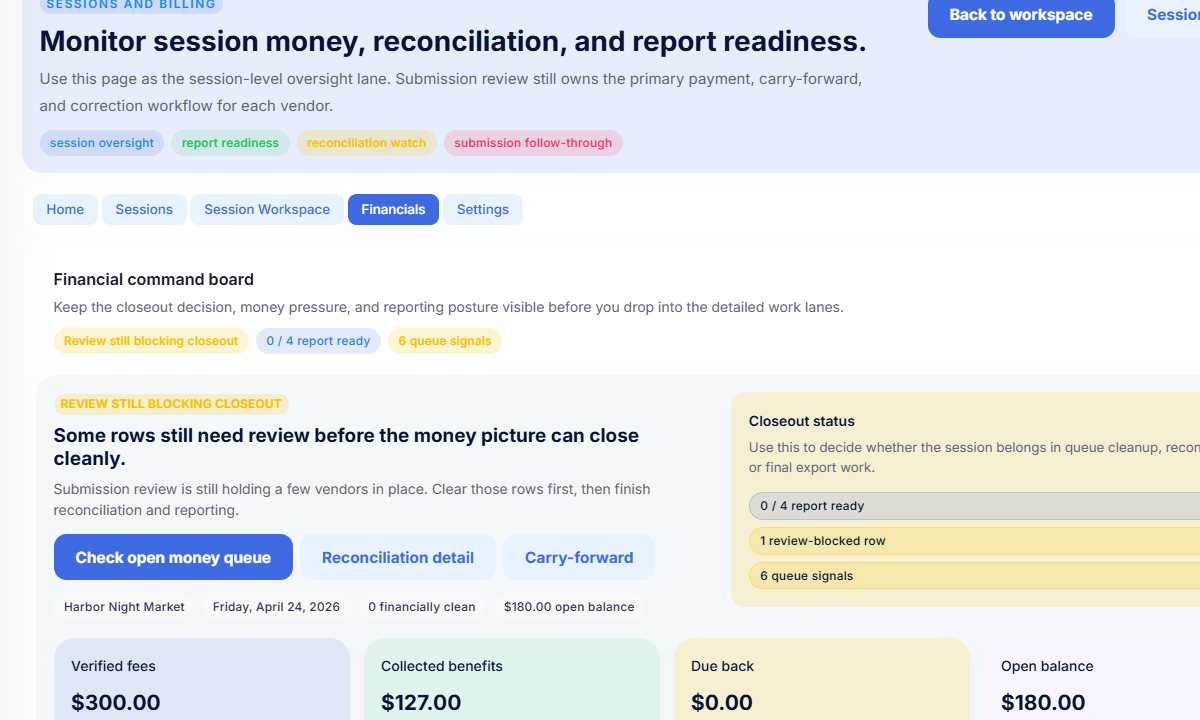
Step 5: Review session financial state
This is where The Market Manager gets more specific than generic payment software.
The session financials workflow reviews:
- who owes money
- who is due cashback or reimbursement
- which rows are review-blocked
- which rows are partially settled
- which rows are clean enough for reporting
So the money review is not only about paid versus unpaid. It is about whether the session can close cleanly.
Step 6: Reconcile references and exceptions
After payments are recorded, your team still needs to trust the references and cleanup state.
The reconciliation workflow is built to surface:
- missing references
- unreconciled settlement legs
- mismatch flags
- rows that still need follow-through
That is much closer to a closeout workspace than a simple payment history screen.
Step 7: Use carry-forward when a balance belongs to a future session
Recurring markets often have money that should follow the vendor into the next session instead of being forced into the current closeout.
That is where carry-forward matters. It gives your team a structured way to move unresolved or future-appropriate balances without losing the history of what happened.
Step 8: Close out with report readiness in mind
The real goal is not only to mark fees paid.
It is to get the session into a clean enough state that:
- reports can trust the numbers
- reconciliation work is complete
- carry-forward is handled
- review blockers are resolved
That is why this workflow is stronger than spreadsheets or a generic invoice tracker.
Why spreadsheets break down
Spreadsheets can list charges and payments, but they struggle once the workflow depends on:
- session submissions
- fee snapshots
- partial settlements
- reconciliation flags
- carry-forward
- report readiness
That is where vendor management software becomes more useful than manually maintained billing tabs.
A better way to manage vendor payments
The Market Manager is farmers market management software built for recurring markets. It helps teams manage fee creation, recorded payments, session financials, reconciliation, carry-forward, and market closeout in one connected workflow instead of spreadsheet billing and manual end-of-day cleanup.
Frequently asked questions
How do farmers markets collect vendor payments?
Markets often record payments through methods like cash, check, card, or bank transfer. The real challenge is connecting those records to fee status, session activity, and closeout.
What is the best way to track vendor payments?
The best way is to track them next to session participation, fee records, and reconciliation state so the market team can see whether a session is actually ready to close.
Why do recurring markets struggle with payments?
Because payments are rarely a standalone workflow. They affect vendor readiness, session reporting, reconciliation, and future balances.
Related resources
- How to run a farmers market
- How to manage vendor applications for farmers markets
- How to assign booths and layout a farmers market
- See pricing
See how it works
Most teams start looking for a better system when vendor payments, fee review, and closeout become too difficult to manage across spreadsheets.
If you want to manage vendor payments without disconnected tools: